
With the Acorn integration, you submit your leads to Acorn's stairlift programme quickly, reliably and fully automatically. This ensures smooth collaboration between your platform and Acorn – without any additional manual effort.
Standard lead data
To use the integration, the following standard lead data must first be captured in your system. This data is mapped automatically and sent directly to Acorn.
"APIKey": "Text(10)",
"Title": "Text(20)",
"FirstName": "Text(100)",
"LastName": "Text(100)",
"Email": "Text(150)",
"TelephoneMain": "Text(50)",
"Address1": "Text(250)",
"Address2": "Text(250)",
"Address3": "Text(150)",
"Address4": "Text(150)",
"PostalCode": "Text(20)",
"Notes": "Text(500)",
Manual mapping of the standard lead data in the lead data mapper is not required!
Custom lead data
Additional lead data beyond the fields listed above can be mapped individually via the comment field. Dynamic lead parameters can be used in this field. This lets you tailor the transmitted data to Acorn's requirements.
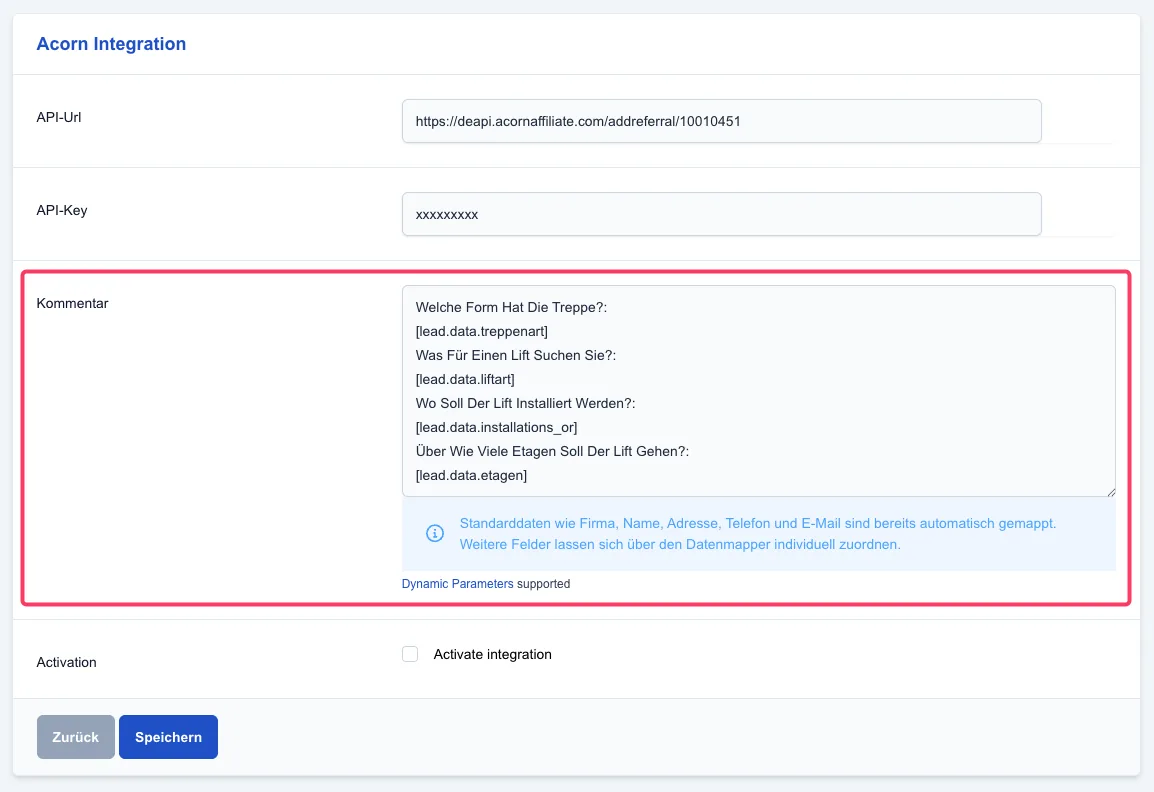
Below is an example of how to use the comment field:
Welche Form Hat Die Treppe?:
[lead.data.treppenart]
Was Für Einen Lift Suchen Sie?:
[lead.data.liftart]
Wo Soll Der Lift Installiert Werden?:
[lead.data.installations_or]
Über Wie Viele Etagen Soll Der Lift Gehen?:
[lead.data.etagen]
In this example, the lead's individual answers to the questions "Welche Form Hat Die Treppe?" (What shape is the staircase?), "Was Für Einen Lift Suchen Sie?" (What kind of lift are you looking for?), "Wo Soll Der Lift Installiert Werden?" (Where should the lift be installed?) and "Über Wie Viele Etagen Soll Der Lift Gehen?" (How many floors should the lift cover?) are automatically transferred into the comment field and forwarded to Acorn.
Important: Please remember to replace the dynamic parameters with your own values. Further information and an overview of all available parameters can be found here:
👉 </support/leads/dynamic-parameters
By using the Acorn integration, you save time and effort and ensure that all relevant information about your leads is sent directly to Acorn. If you have any questions or problems with the integration, you can contact our customer service at any time.