
In fields that support dynamic parameters, various values can be replaced automatically with the corresponding information from the lead, the buyer or the supplier.
Available placeholders
Lead parameters
[lead.salutation] = Salutation of the lead
[lead.first_name] = First name of the lead
[lead.last_name] = Last name of the lead
[lead.street_no] = Street and house number
[lead.street] = Street
[lead.house_no] = House number
[lead.zip_code] = Postcode
[lead.city] = City
[lead.phone] = Phone number
[lead.email] = Email address
[lead.birth_date] = Date of birth
[lead.id] = Lead ID

[lead.delivery_date] = Lead delivery date (dd.mm.YYYY)
[lead.assignment_date] = Lead ID = Lead assignment date (dd.mm.YYYY)
Custom lead data parameters
You will find the exact parameter name in the lead type under custom fields.
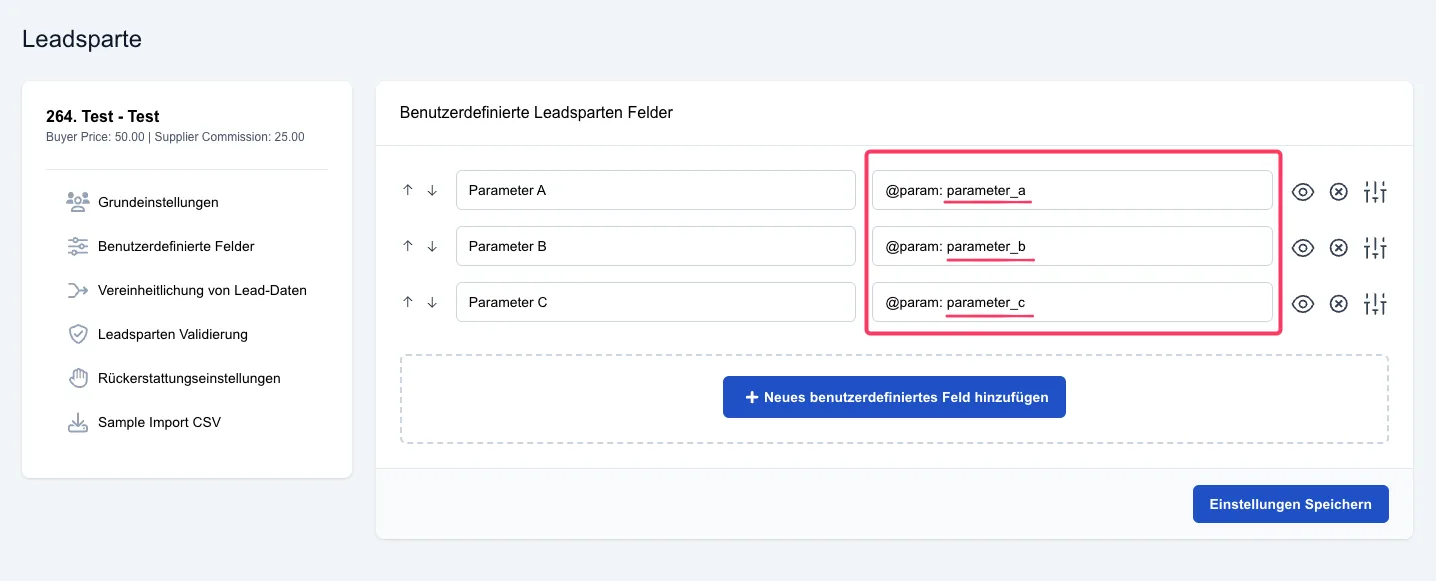
[lead.data.@paramname]
Lead type parameters
[lead.type.short_code] = Short code of the lead type
[lead.type.name] = Name of the lead type
Supplier parameters
[supplier.company] = Company name of the supplier
[supplier.salutation] = Salutation
[supplier.first_name] = First name
[supplier.last_name] = Last name
[supplier.phone] = Phone number
[supplier.email] = Email address
Buyer parameters
[buyer.company] = Company name of the buyer
[buyer.salutation] = Salutation
[buyer.first_name] = First name
[buyer.last_name] = Last name
[buyer.phone] = Phone number
[buyer.email] = Email address
Order parameters
[buyer.company] = Company name of the buyer
[buyer.salutation] = Salutation
[buyer.first_name] = First name
[buyer.last_name] = Last name
[buyer.phone] = Phone number
[buyer.email] = Email address
[order.id] — Order ID
[order.lead_types] — Short codes of the lead types (e.g. PV, WP)
[order.lead_type_names] — Names of the lead types
[order.state] — New state (Active, Paused, Inactive, Deleted)
[order.previous_state] — Previous state
[order.status] — Review status (e.g. Approved, Cancellation pending)
[order.previous_status] — Previous review status
[order.lead_amount] — Number of leads ordered
[order.leads_served] — Leads delivered so far
[order.leads_served_today] — Leads delivered today
[order.delivery_quota] — Delivery quota (e.g. 80 %)
[order.daily_limit] — Daily limit
[order.price] — Price in system currency (e.g. 1.234,50 €)
[order.interval] — Interval (One-off, Daily, Weekly, Monthly)
[order.priority] — Priority
[order.start_date] — Start date
[order.end_date] — End date
[order.delivery_days] — Delivery days (e.g. Monday, Tuesday)
[order.delivery_time] — Delivery time window (e.g. 8:00 – 18:00)
[order.delivery_area] — Delivery area (Nationwide, Federal states, Postcode ranges, Custom postcodes, Custom areas)
[order.delivery_area_details] — Selected federal states, postcodes or areas with radius (e.g. 10115 (25 km))
[order.filters] — Filters of the order (e.g. eigentuemer == ja AND city != Berlin)
[order.exclusive] — Exclusive (Yes/No)
[order.notes] — Notes on the order
[order.created_at] — Creation date
[order.cancelled_at] — Cancellation date
[order.cancellation_effective_at] — Cancellation effective as of
Complaint parameters
[buyer.company] = Company name of the buyer
[buyer.salutation] = Salutation
[buyer.first_name] = First name
[buyer.last_name] = Last name
[buyer.phone] = Phone number
[buyer.email] = Email address
[refund.reason] — Complaint reason
[refund.reason.description] — Description of the complaint reason
[refund.comment]— Comment on the complaint (e.g. justification)
[refund.status] — Complaint status
[refund.created_at] — Complaint date
Dynamic placeholders with fallback values
In text templates, dynamic lead data fields can be used as placeholders. Optionally, a fallback value can be specified that is inserted if the field is empty or does not exist.
Syntax:
- Without fallback: [lead.data.fieldname]
- With fallback: [lead.data.fieldname, 'fallback value']
Examples:
[lead.data.straße]
→ outputs the value of the field, or nothing

[lead.data.straße, 'Unknown']
→ outputs "Unknown" if the field is empty or does not exist
Notes:
The fallback value can be enclosed in single ('...') or double ("...") quotation marks.
Values such as "0" are considered valid — the fallback is only used for empty or missing fields.
Field names may contain letters (including umlauts), digits, underscores and hyphens.