
Leadnodes
Features Integrations
Call Center Vertrieb Multi Level Marketing Online Marketer Online Portale Door to Door
Pricing
English Deutsch
Free assessment Login
Topics
  • Getting started2
    • Creating new users in Leadnodes
    • How to create a New Lead Order
  • System settings18
    • Automations
    • Branding settings
    • GDPR settings
    • How do I enable or disable notifications about new lead purchase requests?
    • How do I manage email senders and domains?
    • How do I manage lead tags and define in which areas (Admin, User, Outreach) they are available?
    • How do I set the time zone for my system?
    • How do I tag leads automatically?
    • How do I trigger automations when a tag is attached to a lead?
    • How do I use condition groups in system automations?
    • Lead Scoring Settings
    • Payments and finance
    • Refund settings for the system
    • System basic settings
    • System settings
    • Webhooks
    • What are possible causes of a soft bounce?
    • What is a hard bounce?
  • Users & permissions15
    • Account settings
    • API Tokens
    • Delivery pauses for a user
    • Do I also need to create a user for leads I produce myself?
    • Individual lead commissions
    • Integrations
    • Notifications
    • Payment & Financials
    • Prepaid account
    • Refund settings for a user
    • UI Restrictions
    • User Profile
    • Users
    • Webhook Import
    • Why can't users be deleted?
  • Leads & lead types16
    • Basic settings
    • Creating lead types
    • CSV template for lead imports per lead type
    • Custom fields
    • Dynamic Parameters
    • How can I organise custom fields into groups?
    • How do I create dynamic QR codes for lead forms and landing pages?
    • How do I find lead partners in the lead provider network?
    • Lead forms
    • Lead log details
    • Lead type validation
    • Marketplace features (activating)
    • Refund settings for a lead type
    • Sample Import CSV
    • Standard lead parameters
    • This phone number is on the blacklist, but it could still be assigned. Why?
  • Orders & distribution14
    • Advanced order filters
    • Delivery pauses for an order
    • Do I have to duplicate multi-sale leads manually?
    • How can I filter by a custom field?
    • How can I restrict suppliers for orders?
    • How can I undo a lead assignment?
    • How can leads that are already assigned be assigned again?
    • How do I find already-sold multi-sale leads for an order (reverse search)?
    • How do I prevent multiple users from the same group receiving the same multi-sale lead?
    • How do I use exclusive orders with multi-sale lead types?
    • I think my order isn't picking up any leads – how can I check?
    • Lead orders
    • Using custom fields in automations and order filters
    • What are multi-leads and how are they created?
  • Complaints7
    • Complaint reasons
    • Complaints
    • How are leads with complaints compensated in orders?
    • How do I file a complaint for a lead via the API?
    • How do I filter lead exports by complaint status?
    • Objections
    • Partner complaints
  • Billing10
    • How do I add credit without an invoice or pay out a user's credit?
    • How do I cancel a system subscription as a system administrator?
    • How do I set individual marketplace prices per user?
    • How is the service period determined on outgoing invoices?
    • Incoming invoice
    • Invoices
    • Outgoing invoices
    • Payment statements
    • Recurring payments
    • SEPA export
  • Integrations22
    • Acorn integration
    • AroundHome Complaints Integration
    • Finanzen.de lead import
    • Heyflow Incoming Webhook
    • How do I connect Leadnodes to Zapier?
    • How do I import leads automatically from EZA (Einfach zum Angebot)?
    • How do I import leads by email and how must the email be formatted?
    • How do I import my check-direkt.de leads automatically by email?
    • How do I run buyer or supplier integrations via an automation?
    • How do I set up the Enpal.pro webhook integration?
    • How do I use the Universal Data Mapper for integrations?
    • How does the registration webhook work and how is it structured?
    • HubSpot Integration
    • Importing leads into Leadnodes via webhook
    • Monday CRM integration: transferring leads from Leadnodes easily
    • Reonic integration
    • Wattfox integration
    • Webhook integration
    • What data does the webhook export contain (payload structure)?
    • What is the difference between LeadDesk and LeadDesk Global?
    • WPForms (WordPress)
    • Webhooks in Leadnodes: which webhook for what?
  • Other topics2
    • Markdown cheat sheet
    • Setting up a custom customer login for your Leadnodes system
All topics
Back to overview
Support › System settings

System basic settings

Last updated on June 24, 2025

Once you have received your login details from us, you can log in and take your first steps in the system.
For optimal use, we recommend configuring a few basic settings first.

In the menu on the left, navigate to System settings.
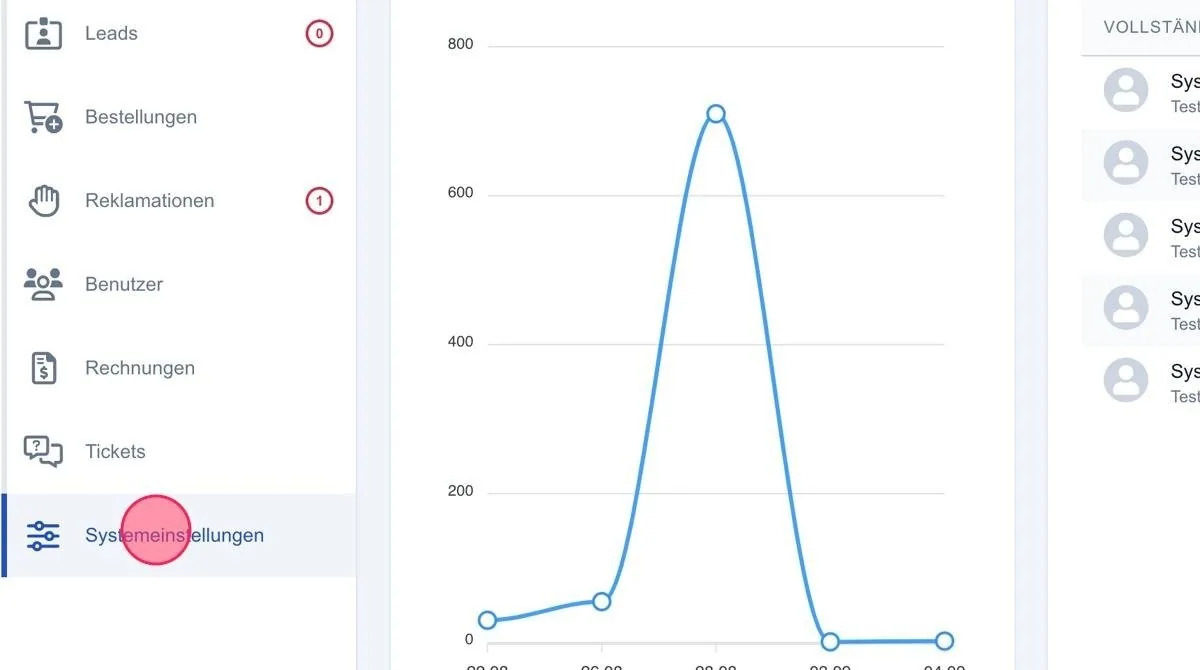
Screenshot: System basic settings

You can now navigate to Basic settings in the submenu.
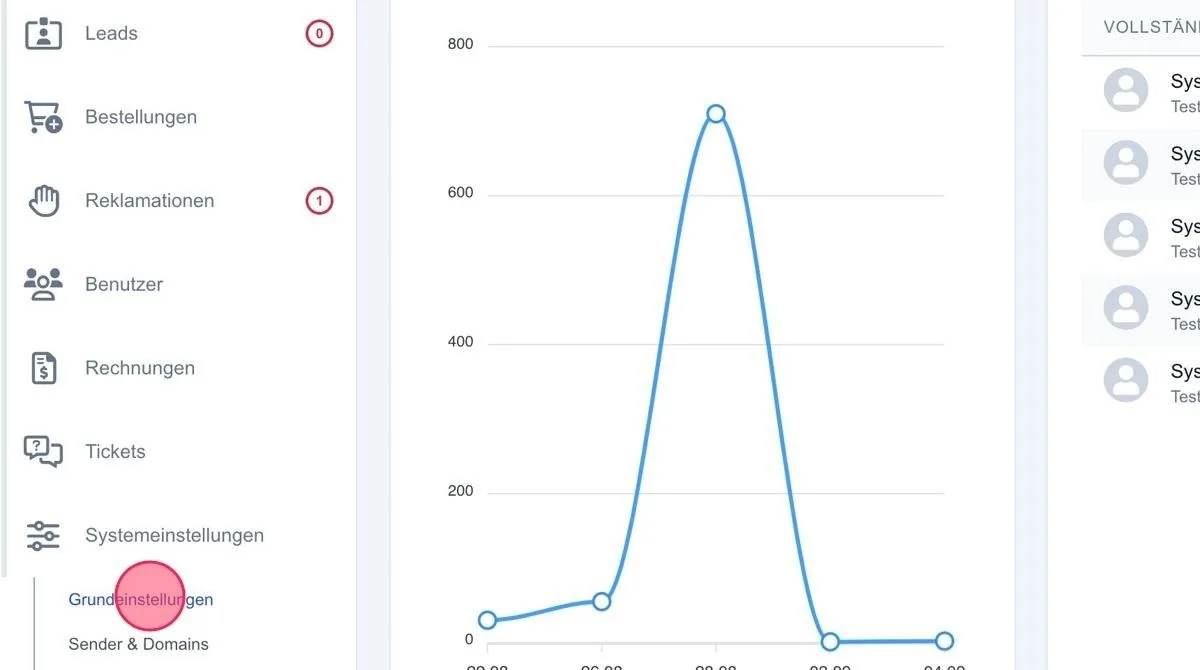
Screenshot: System basic settings

Related articles

  • System settings In this section you can enter all basic information relating to your contact details, which also appear on the emails, invoices etc. …
  • How do I set the time zone for my system? Configure your system’s time zone for correct date and time displays in all reports, leads and orders.
  • Branding settings In the branding settings area you can configure the visual identity of your organisation.
  • GDPR settings If you work in line with the GDPR, you should configure the relevant functions here so that you receive lead data exclusively via the system and …

← Back to support overview

Leadnodes

The all-in-one platform to capture, validate, distribute and automatically bill leads.

No spam. Unsubscribe anytime.

Service & Support

Support Pricing Free assessment Buy & sell leads Industries Solutions White-Label Affiliate program

Company

About us Contact Imprint Privacy Careers Blog Guides Glossary

Security & Compliance

SSL-gesichert Server-Security DSGVO-konform

Leadnodes and other tools

Leadnodes is not just another all-in-one platform or a complex CRM. These pages show where the greatest value lies: as the central platform for automating and distributing your leads – integrated into your existing tools and processes.

Platform

Features Integrations Comparisons

Use cases

Call center Sales Online marketer

Get started

Free assessment Contact Blog
© 2026 Leadnodes GmbH Made for the lead trading business.

We respect your privacy

We use cookies to operate the website and — with your consent — to analyse usage. You can accept or decline optional cookies. Privacy policy

Newsletter

Stay ahead in lead trading.

About once a month: new features, practical know-how and comparisons from the lead trading market, straight to your inbox.

  • Be the first to hear about new Leadnodes features
  • Guides, comparisons and tools for your lead business
  • No spam, unsubscribe anytime

No spam. Unsubscribe anytime.