
With the Leadnodes HubSpot integration, leads captured in Leadnodes can be transferred seamlessly to HubSpot. This connection allows you to create and maintain leads in HubSpot automatically, which streamlines your workflow and makes follow-up more efficient. The integration ensures that all relevant lead data is synchronised in real time, keeping your CRM up to date at all times.
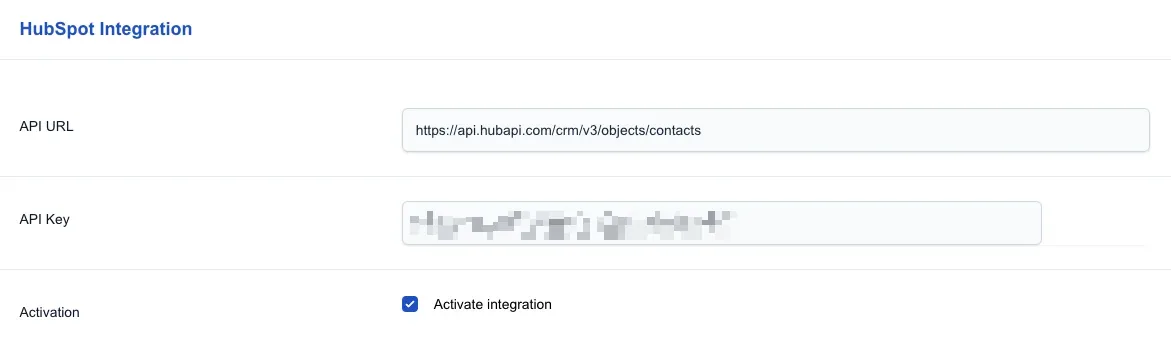
To connect Leadnodes with HubSpot, you need the API URL and your HubSpot API key. You will find further information below:
HubSpot API URL
https://api.hubapi.com/crm/v3/objects/contacts
HubSpot API Key
https://developers.hubspot.de/beta-docs/guides/apps/private-apps/overview
Lead data
By default, the following lead data is automatically linked to the corresponding HubSpot contact data and does not need to be mapped manually.
- First name
- Last name
- Address
- Postcode
- Phone number
Important!
If a lead does not contain one of the standard fields listed above, the default value “n/a” is transmitted.
Additional values can be linked via the integration's data mapping.
Data mapping
To link further lead data with the corresponding HubSpot contact data, use the Lead Data Mapping.
Int. Lead Param
Specifies the Leadnodes-internal parameter.
Int. Lead Value
Defines the value at which data mapping should take place.
Ext. Lead Param
Specifies the corresponding HubSpot parameter.
Ext. Lead Value
Defines the value to be transmitted.
Example data mapping
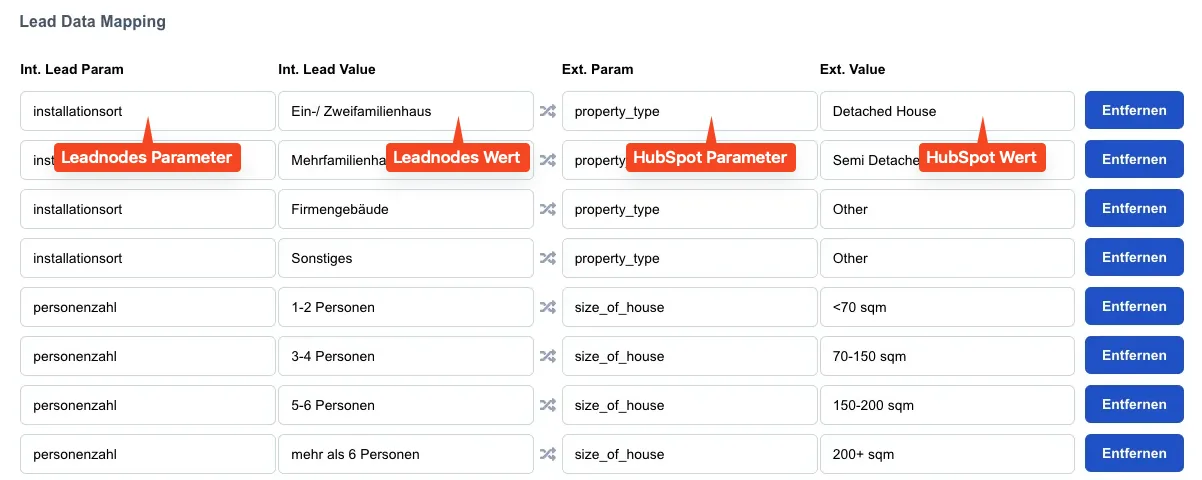
HubSpot parameters
Important!
Here you will find further information on how to find and edit the names of your custom parameters in HubSpot:
https://knowledge.hubspot.com/properties/create-and-edit-properties